If you run a home service business, you’ve probably sat through at least one software demo and walked away more confused than when you started. ServiceTitan, Housecall Pro and Jobber are the three names that come up the most.
Here’s the short version. The best software is the one your team actually uses every day. The right pick depends mostly on how big your team is today and how big you plan to get. This post compares what each one costs, who it’s built for, and how to choose.
If you’re comparing ServiceTitan with a marketing platform instead, read our ServiceTitan vs HighLevel comparison. For plumbers specifically, see the best CRM for plumbers.
What each one costs
| Jobber | Housecall Pro | ServiceTitan | |
|---|---|---|---|
| Published pricing | Yes | Yes | No, quote only |
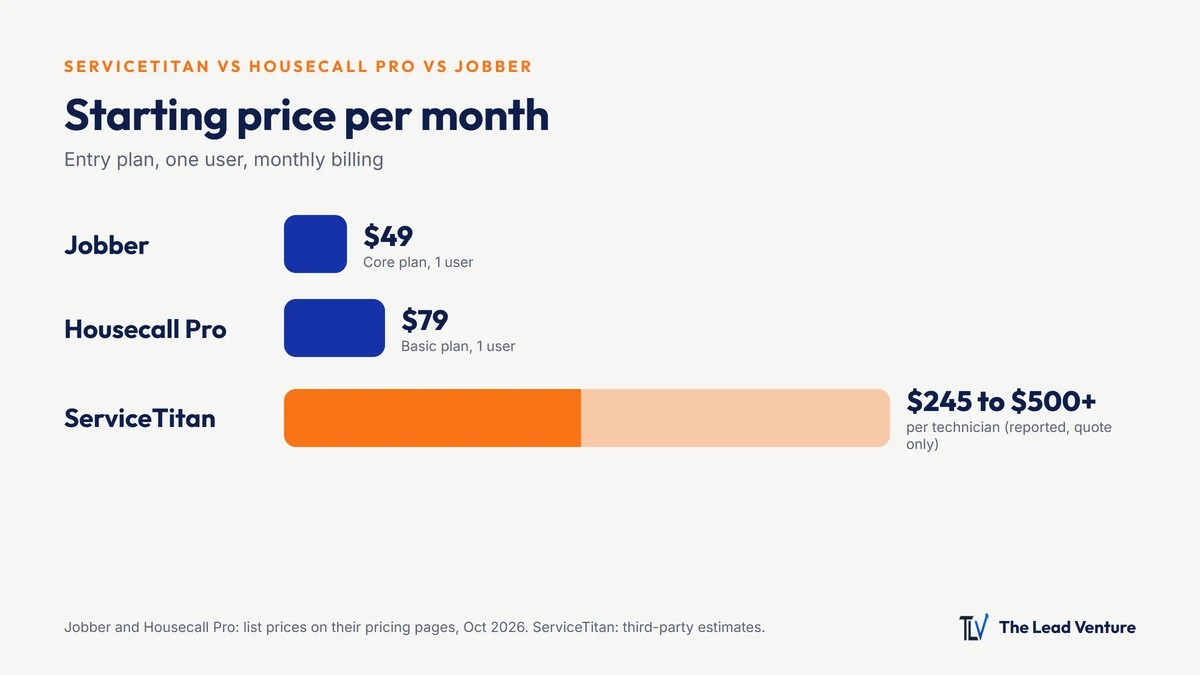
| Starting price (monthly billing) | $49/mo (Core) | $79/mo (Basic) | Reported $245 to $500+ per technician/mo |
| Higher tiers | Connect, Grow, Plus | Essentials ($189), MAX ($329) | Starter, Essentials, The Works |
| Annual discount | Yes | Yes | Contracts are typically annual (reported) |
| Setup costs | Low | Low | Reported $5,000 to $50,000+ |
Jobber and Housecall Pro prices are from their pricing pages in October 2026. ServiceTitan doesn’t publish prices; the range comes from third-party reports. Prices change often, so confirm before you buy.
The monthly price is only part of the cost. Add extra users, add-ons (like phone systems or marketing tools), payment processing fees, and the hours your team spends learning a new system.
Who each one is built for
Jobber: solo operators and small crews
Jobber is popular with lawn care, cleaning, landscaping and other route-based home services. It’s known for being easy to set up and for clean quoting, scheduling and invoicing. If you’re a one- to five-person operation and want to stop running the business from a notebook and your text messages, it’s a common first step.
Housecall Pro: small to mid-size service shops
Housecall Pro is widely used by HVAC, plumbing, electrical and other service-call businesses. It covers scheduling, dispatch, estimates, invoicing and payments, with higher plans adding more automation and team features. It tends to fit shops with a few trucks that want more than the basics without enterprise pricing.
ServiceTitan: larger HVAC, plumbing and electrical companies
ServiceTitan is built for bigger operations: multiple trucks, a dispatch team, a call center, memberships, pricebooks and detailed reporting. It’s powerful, but it’s priced and implemented like enterprise software. Companies that get the most out of it usually have the office staff to run it.
How to choose based on your size
| Your business | Where most start |
|---|---|
| Solo, or owner plus a helper | Jobber or Housecall Pro entry plans |
| 2 to 5 trucks | Jobber or Housecall Pro mid-tier plans |
| 6 to 15 trucks with an office team | Housecall Pro’s upper plans, or a ServiceTitan demo |
| 15+ trucks, dispatchers, call center | ServiceTitan is worth a serious look |
These are rough guides, not rules. A five-truck HVAC company with big growth plans might move to ServiceTitan early. A twenty-person lawn company might be happy on Jobber for years.
Questions to ask in every demo
- What’s the total cost for my team size, including setup, add-ons and payment processing?
- How long is the contract, and what does it cost to leave?
- How long does setup take, and who does the work: you or them?
- Can I export my customer list and job history if I switch later?
- Does it work well on my techs’ phones in the field?
- What does it connect to? Accounting, your phone system, your marketing tools.
The part none of them solve
Software runs the jobs you have. It doesn’t create the ones you don’t. All three tools help you schedule, dispatch and get paid. None of them, on their own, get you found on Google, answer the call you missed while you were on a roof, or follow up on the estimate that went quiet.
That’s what the Booked Solid System handles: getting found, answering fast with missed-call text-back, collecting reviews, and following up automatically. It works alongside whichever field service software you choose.
Your software decision checklist
- Count your current trucks, techs and office staff
- Write down where you want to be in two years
- Demo at least two options with your real workflow
- Get the total first-year cost in writing
- Check contract length and how you can export your data
- Have one tech and one office person test it before you buy
- Decide what handles leads and follow-up, since the software won’t